Text to speech for everything you read

PDFs, ebooks, articles, even photos of a page. Speeches AI reads them aloud in a natural voice and highlights each sentence, so you can listen and follow along.

Free preview, no sign-up required.

chapter-3.pdfSample reading

Some books are meant to be read slowly, one sentence at a time. Others wait on the nightstand for months, half finished. Listening lets you pick them up again on the way to work. And when a line matters, you can always go back and hear it twice.

01 / 04 sentences
Your reading, in one place
A voice you can settle into
Follow every sentence
Listen at your own pace

Listen to PDFs, ebooks, web pages and photos

Not just pasted text. Bring the things you actually need to read and let the reader do the rest.

Read PDFs and documents aloud

Upload a PDF, Word file, Markdown or TXT and listen in a reader that keeps the original layout. Turn a long report or paper into an audiobook, up to 100,000 characters.

Listen to a PDF

Turn ebooks into audiobooks

Drop in an EPUB and hear it chapter by chapter, with a table of contents to jump straight to the part you want.

Upload an ebook

Read web pages aloud

Paste a link to an article or blog post. We pull out the main text, leave out most menus and ads, and let you tidy it up before you listen.

Paste a link

Image to speech

Snap a page, a handout or a screenshot. We recognize the text in up to 20 images and read it aloud, and you can correct any sentence that came out wrong.

Upload photos

How to convert text to speech

Three steps, no software to install.

Add your text

01

Paste text, add a web page link, or upload a document, ebook or photos. Text from a link can be edited before you listen.

Pick a voice and speed

02

Play a short sample of each voice and choose the one that fits what you're reading. You can change the speed any time while you listen.

Press play and follow along

03

Listen in the reader with the text highlighted, then download the MP3 if you want to keep it.

Made for people who read a lot

Give your eyes a break and get through your reading list wherever you are.

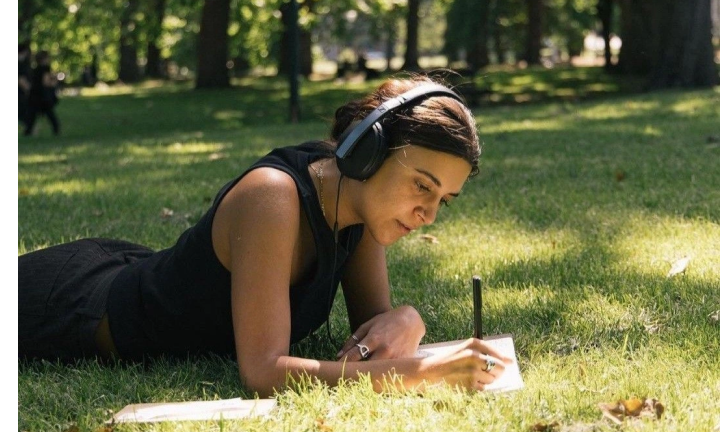
Student listening to headphones while studying outdoors

Studying and research

Listen to lecture notes, textbooks and papers while reading along. Hearing and seeing the text together helps it stick.

Commuter listening to articles on a train

Articles on the go

Save the long reads you never get to and listen during your commute, workout or chores.

Reader listening to an ebook at home

Ebooks without an audiobook

Many books never get an audio version. Turn your own EPUB files into something you can listen to.

Writer reviewing a draft while listening

Proofreading your own writing

Hearing your draft read aloud makes typos, missing words and clumsy sentences much easier to catch.

Language learner reading and listening on a train

Language learning

Read English or Chinese text while hearing it spoken clearly, and slow it down when you need to.

Person relaxing with headphones

Easier reading for everyone

Helpful for dyslexia, low vision, eye strain or anyone who simply takes in information better by listening.

Natural AI voices in English and Chinese

A hand-picked set of calm, clear voices made for long-form listening. The language is detected from your text automatically.

VELVET VOICE

Documentaries · Health & Wellness

Sleepy

Documentaries · Health & Wellness

Able dan garden

Documentaries · Health & Wellness

old man 2

Documentaries · Trailers

vector tales

Explainers · Documentaries

Mysterious Ocean Voice

Documentaries · Trailers

Preview a voice, then choose it in the reader.

Frequently asked questions

01Is Speeches AI text to speech free?

You can try text to speech without an account, subject to guest usage limits. Signed-in users pay 1 credit per UTF-8 byte of billable text.

02What is a text to speech reader?

A text to speech reader turns written text into spoken audio and shows the text while it plays. Speeches AI highlights each sentence as it's read, so you can listen and read along at the same time.

03Which files can it read aloud?

PDF, Word (DOC and DOCX), EPUB, Markdown and TXT files, plus JPG, PNG and WebP images. Each file can be up to 20 MB, and you can upload up to 20 images at once (3 without an account).

04How do I listen to a PDF?

Open the Document tab and drop in your PDF. It opens in the reader with its original pages, so you can pick a voice and press play. Each sentence is highlighted as it's read, and you can jump between pages from the side panel.

05Can it read a web page aloud?

Yes. Paste the link to a public article or page and we pull out the main text for you to review. Pages behind a login or paywall can't be opened; in that case copy the text and paste it in.

06Can it read scanned PDFs or photos of text?

Scanned PDFs without a text layer aren't supported yet. Save the pages as images and upload those instead: we recognize the text in photos and screenshots, and you can correct any sentence before listening.

07How long can the text be?

Up to 100,000 characters per document, roughly 15,000 to 18,000 English words. For longer books, split them into parts.

08Which languages are supported?

Speeches AI currently reads English and Chinese, with six voices for each. The language is detected from your text, and you can preview each voice before you generate.

09Can I download the audio as MP3?

Yes. Once the full audio is generated, signed-in users can download it as an MP3 from the player.

10Do I need to install anything?

No. Speeches AI runs in your browser on desktop and mobile. Just open the site, add your text and press play.

Start listening to your reading list

Paste some text or upload a file and hear the first minute free. No sign-up needed.

Try text to speech free